AeroLab v1.0: Building a Personal Cybersecurity Homelab
Overview
AeroLab v1.0 is my personal cybersecurity homelab built to develop hands-on skills in defensive security, threat detection, and enterprise IT operations. What started as two refurbished machines has evolved into a structured environment for continuous learning and practical application of cybersecurity concepts.
The lab focuses on blue team operations - specifically SOC analysis, digital forensics and incident response (DFIR), and threat intelligence. Every component is designed to simulate real-world enterprise environments where I can practice detection, analysis, and response.
Hardware
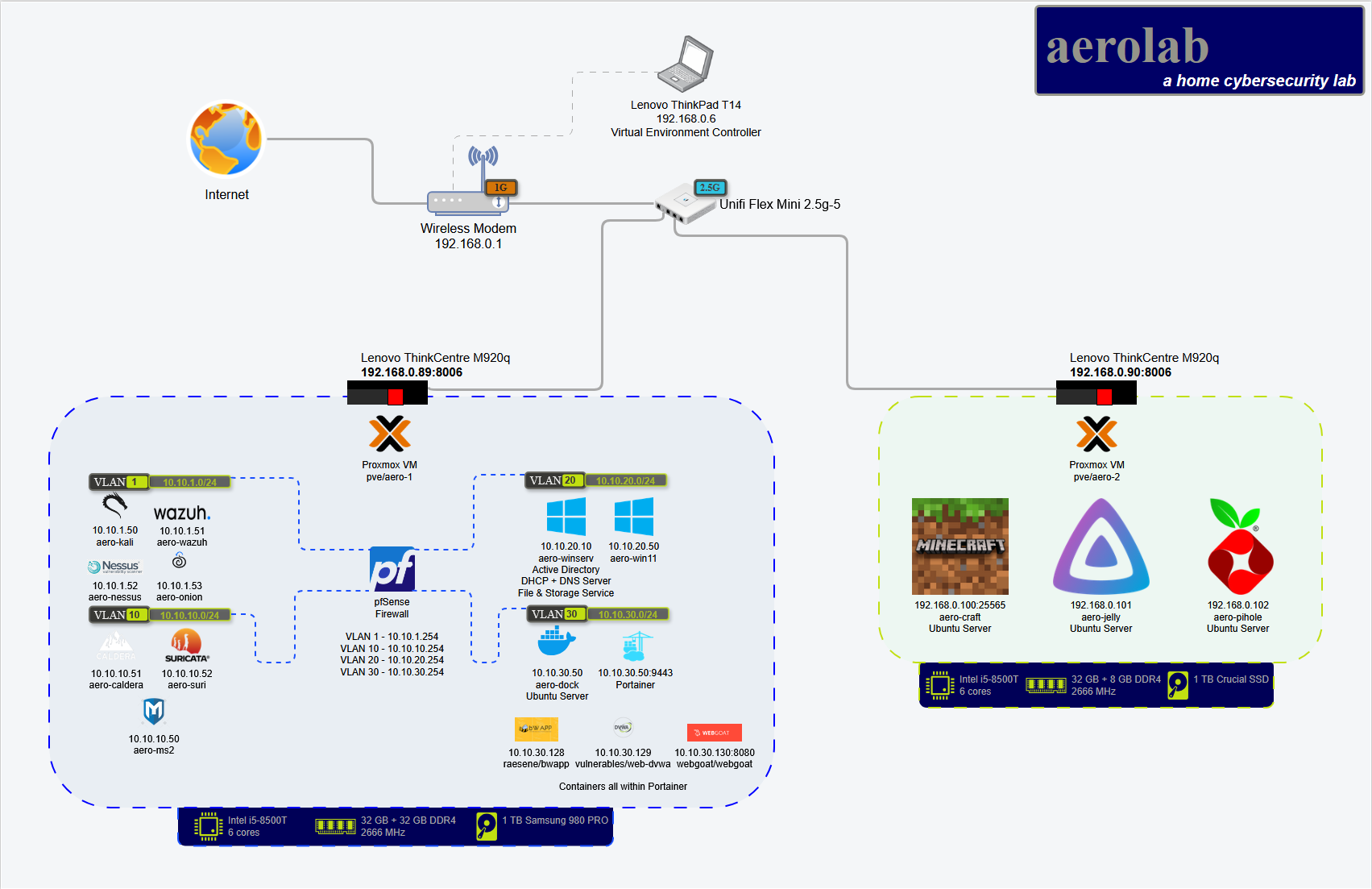
The lab runs on two Lenovo ThinkCentre M920q ultra-small form factor nodes - compact, quiet, and enterprise-grade at a budget price:
Node 1:
- Upgraded to 64 GB RAM for resource-intensive VMs
- Handles SIEM, Active Directory, and detection infrastructure
Node 2:
- Stock RAM configuration
- Runs utility services and lighter workloads
Both nodes are:
- Clustered via Proxmox for centralized management
- Administered remotely from a Lenovo T14 ThinkPad
- Network-segmented with VLANs for security isolation
Total investment: ~$300 USD (hardware + upgrades)
Architecture
Network Segmentation
The lab implements enterprise-style network segmentation using VLANs:
- Management network for Proxmox administration
- Production network for Windows domain services
- Security monitoring network for SIEM and IDS
- Isolated testing network for vulnerable applications
Core Infrastructure
pfSense Firewall (planned dedicated node)
- Enterprise-grade routing and firewall rules
- VLAN segmentation and traffic filtering
- Network traffic visibility
Wazuh SIEM
- Centralized log aggregation from all endpoints
- File integrity monitoring
- Rule-based alerting for suspicious activity
- Real-time threat detection
Suricata IDS
- Network-based intrusion detection
- Monitors internal traffic between VLANs
- Custom rule development for threat detection
Windows Active Directory
- Windows Server 2025 domain controller
- DNS and file sharing services
- Group Policy management
- Domain-joined Windows 11 workstation for endpoint testing
Security Testing Environment
Kali Linux
- Reconnaissance and vulnerability scanning
- Penetration testing toolkit
- Attack simulation for detection validation
Docker + Portainer
- Containerized vulnerable applications (DVWA, bWAPP, WebGoat)
- Attack/defense practice scenarios
- Isolated from production network
Learning Objectives
This lab supports hands-on experience with:
Blue Team Operations:
- SIEM log analysis and event correlation
- Network traffic analysis with Suricata
- Endpoint detection and response
- Incident investigation workflows
Enterprise IT:
- Hypervisor management with Proxmox
- Windows domain administration
- Network segmentation and firewall configuration
- Centralized logging and monitoring
Threat Detection:
- Building custom detection rules
- Validating alerts against simulated attacks
- Correlating indicators across multiple data sources
- Understanding adversary TTPs
Planned Enhancements
Hardware:
- Dedicated node for pfSense/OPNsense firewall
- 2.5 GbE NICs for higher throughput
- NAS for centralized storage (logs, snapshots, backups)
- 8U rack with proper cable management
- UPS and cooling for reliability
Services:
- Pi-hole for DNS-based filtering
- Raspberry Pi touchscreen for monitoring dashboards
- Additional vulnerable VMs for practice
- Threat intelligence feed integration
Lessons Learned
Start Small: Two machines and open-source tools are enough to build a meaningful lab.
Focus on Detection: Installing tools is easy - learning to detect threats with them takes practice.
Network Segmentation Matters: Proper VLAN isolation forces you to think like a network defender.
Document Everything: This writeup is as much for future-me as anyone else. I’ll need to rebuild this eventually.
Technical Stack
- Hypervisor: Proxmox VE (clustered)
- SIEM: Wazuh
- IDS: Suricata
- Firewall: pfSense (planned)
- Domain Services: Windows Server 2025
- Containers: Docker + Portainer
- Testing: Kali Linux, DVWA, bWAPP, WebGoat
Resources
Conclusion
AeroLab v1.0 is my cornerstone for hands-on cybersecurity learning. It’s where I break things, troubleshoot errors, and build real-world readiness. Version 2.0 is already in progress - more hardware, more services, more scenarios to practice defending against.
The best part? Once you start building a homelab, you won’t want to stop.