droids1
Category: Reverse Engineering Difficulty: Hard
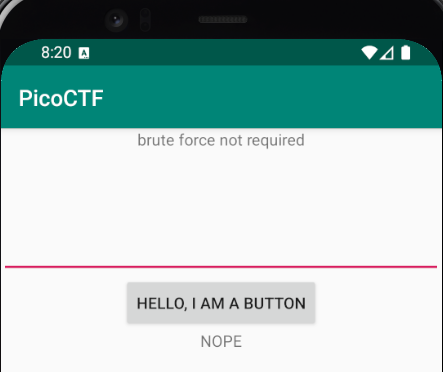
Most Android reversing writeups jump straight to decompiling DEX or analyzing native libraries. This challenge teaches you something more fundamental: sometimes the answer is just sitting in the resources folder.
Challenge Description
Where do droid logs go?
Given files: one.apk
Initial Reconnaissance
First things first: we need an environment to actually run this APK. Android Studio provides everything needed, including the emulator, ADB tooling, and SDK platform tools.
After spinning up a Pixel 4 emulator with Android 10 or higher, verify connectivity (from C:\Users\<user>\AppData\Local\Android\Sdk\platform-tools) using Windows Command Prompt:
adb devices
Install the APK:
adb install one.apk
The app installs successfully. Launch it using the monkey tool:
adb shell monkey -p com.hellocmu.picoctf -c android.intent.category.LAUNCHER 1
This opens the app in the emulator. We’ll need the package name later to extract the installed APK properly.
adb shell pm list packages -3

Output shows: package:com.hellocmu.picoctf
Approach
Step 1: Extract the Installed APK
APKs get renamed when installed on Android. To pull the actual installed version:
adb shell pm path com.hellocmu.picoctf
adb pull /data/app/~~randomstring~~/com.hellocmu.picoctf-randomstring/base.apk picoctf.apk
Now we have a local copy to tear apart.
Step 2: Decode with apktool
Decompilers like JADX are useful, but apktool gives us something better: readable smali code and all the app resources in their original structure.
apktool d picoctf.apk -o decoded
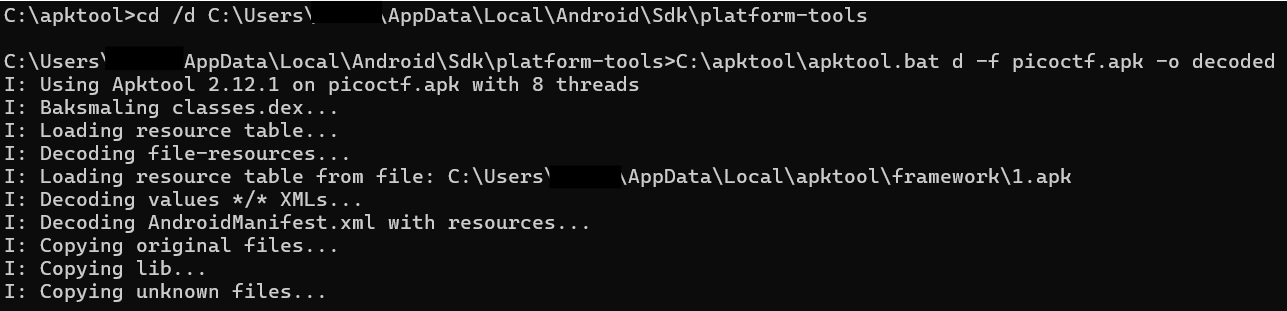
This extracts:
smali/- Dalvik bytecode in human-readable formatres/- All resources (layouts, strings, drawables)AndroidManifest.xml- App configuration
Step 3: Find the Password Logic
Opening decoded/smali/com/hellocmu/picoctf/MainActivity.smali, the button click handler shows:
invoke-static {v0, p0}, Lcom/hellocmu/picoctf/FlagstaffHill;->getFlag(Ljava/lang/String;Landroid/content/Context;)Ljava/lang/String;
The user input gets passed to FlagstaffHill.getFlag(). Let’s check that class.
In FlagstaffHill.smali, the validation logic is straightforward:
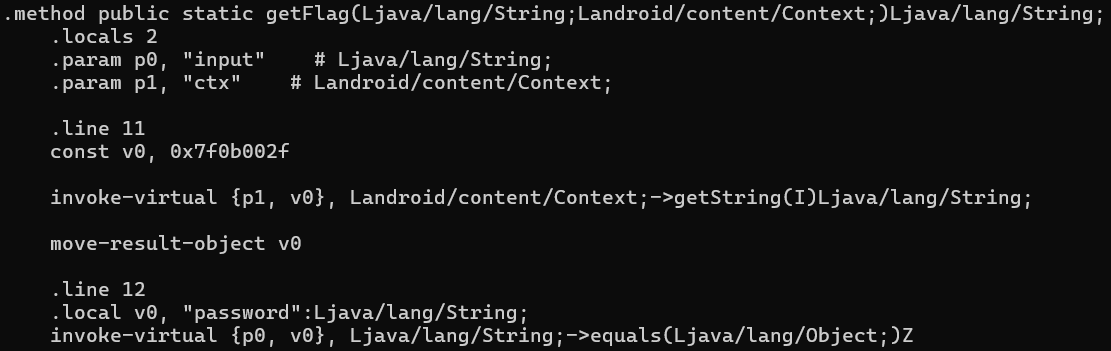
const v1, 0x7f0f002f    # R.string.password

invoke-virtual {p1, v1}, Landroid/content/Context;->getString(I)Ljava/lang/String;

invoke-virtual {p0, v0}, Ljava/lang/String;->equals(Ljava/lang/Object;)Z
Translation:
- Load string resource
R.string.password - Compare user input with that string
- If match, call native function
fenugreek() - If no match, return “NOPE”
The password isn’t computed or obfuscated, it’s a static resource.
Step 4: Resolve the Resource
From R$string.smali:
.field public static final password:I = 0x7f0f002f
That’s just the resource ID. The actual value lives in res/values/strings.xml:

<string name="password">opossum</string>
There it is.
Solution
Run the app in the emulator and enter the password:
opossum
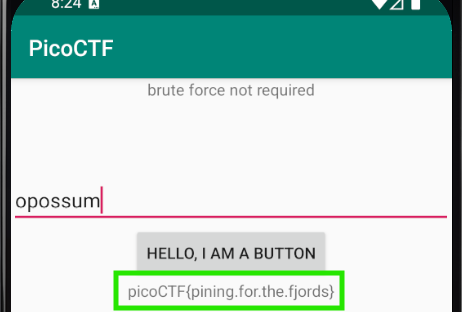
The native fenugreek() function executes and displays the flag.
Flag (click to reveal)
`picoCTF{pining.for.the.fjords}`Tools Used
- Android Studio - Emulator and development environment
- ADB (Android Debug Bridge) - APK installation and extraction
- apktool - APK decoding to smali and resources
Lessons Learned
- Android string resources are easy targets for reversing; always check
res/values/strings.xmlbefore diving into smali or native code apktoolpreserves the original resource structure better than pure decompilers- Understanding Android’s resource resolution system (
R.string.*, resource IDs) saves time - Native JNI functions aren’t always the challenge; sometimes they only execute after you’ve already solved the real puzzle
The challenge name “droids1” and the question “Where do droid logs go?” was a hint toward Android resources and logging mechanisms, though the solution was simpler than expected.